|
 |
|
ReStackor
Web
User Manual
Input
file
Needle
Geom
Output
file
Bump Velocity

|
ReStackor
User Manual
Finally
computer software to tune a shim stack
ReStackor
Inputs
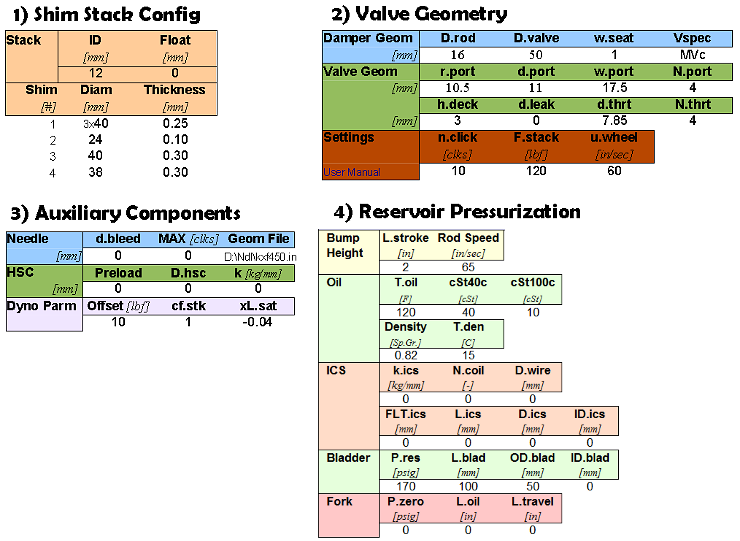
There
are
four
sections
to
the
ReStackor
input file:
-
Shim
stack configuration
-
Damper
Geometry
-
Valve
Port
Geometry
-
Settings
Each
ReStackor
input
parameter
defines
a
geometric
dimension
of
the
shock
that
can
be
tuned
and
modified
to
control
the
damping
force
curve
.
ReStackor
outputs
are
defined
here
.
|
ReStackor
Spreadsheet Operation
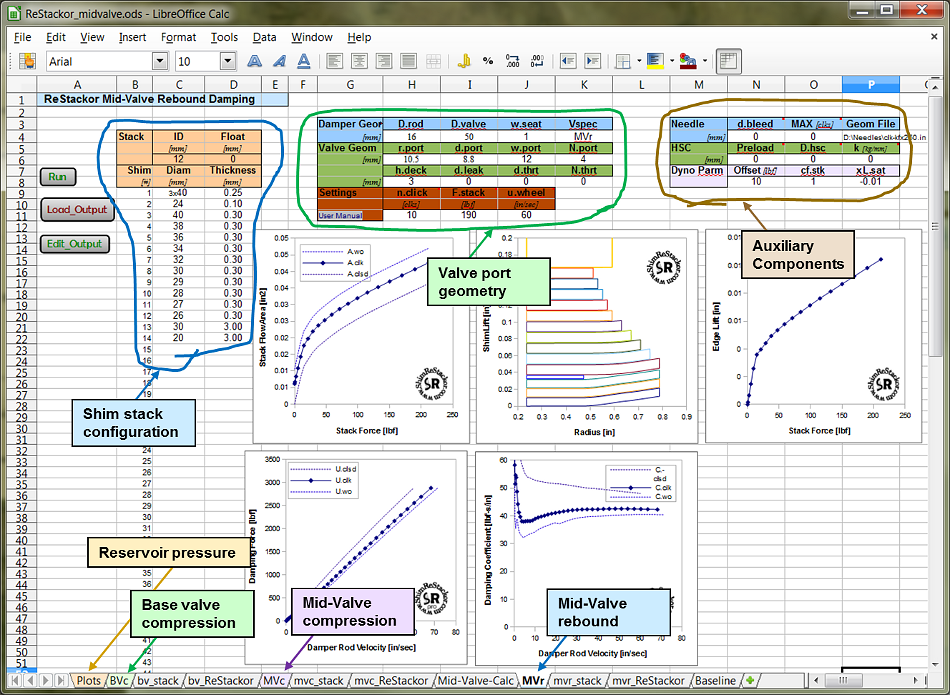
ReStackor inputs have been
purposely
designed
to
use
simple
geometric
inputs
you
can
easily
measure
in
your
garage
to
setup
ReStackor
for
anything
from
mountain
bikes,
sport
bikes,
mx
bikes
or
trophy
trucks.
-
Run
Button
-
Load
Output
Button
-
Edit
Output
Button
Macros
in
the
ReStackor spreadsheet write the
calculation inputs to a file. The
macros
are
hard
wired
to
find
the
inputs
at
the
specific
cell
locations
shown
above.
Because
of
the
hard
wired
references you cannot move the inputs
around on the worksheet. It is a good idea
to have a backup of the ReStackor spreadsheet incase you muck something
up on the one you are working on.
You can add another
worksheet, or "tab", to the ReStackor
workbook for making your
own
calculations. That
new
worksheet
needs
to
be
added
after
the
last
tab
in
the
workbook.
On that
new
worksheet you can add data to any cell you
want,
reference
data
on
other
tabs
and
manipulate
the
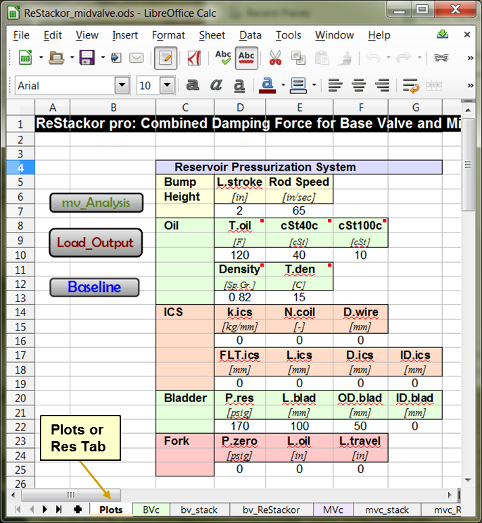
calculation outputs anyway you want. Only the "Plots", "stack" and "ReStackor"
worksheets are accessed by the macros.
|
Shim
Stack
Configuration
The
stack configuration
in
columns
C
and
D list
the
diameter
and
thickness for each
shim
in the stack.
Shim
1
is on the valve face.
Definitions
of
each
input
parameter is given below.
-
ID
[=]
The inside diameter of the shims in
millimeters,
cell
C6. All shims in the
stack have the same inside diameter.
-
Float
[=]
Stack
float,
cell
D6. The gap in millimeters between the
first shim and valve face, usually zero.
-
Positive
values of float lift the
stack
off of the valve face using the
classic definition of float.
-
Negative
values of float preload the
stack
for modeling of
digressive
damper valves
with
a
dish
or
lip
preloading
the stack.
-
Shim
Stack
Configuration
:
Cells
B9
through
D58.
-
Shim
#
[=]
Column
B.
Up to 50 shims can be
input. If you only need 10 shims leave
the rest of the cells blank.
-
Split
ring
shims
are
entered
by
repeating
the
shim
number
twice
as
shown
in
the
example.
-
Diam
[=]
Column
C.
Shim
outside diameter
in millimeters.
-
Thickness
[=]
Column
D.
The thickness of each shim
in millimeters.
-
Don't forget to enter the clamp shim at the
end
of the
stack.
Stack
preload,
Float
and
Split
Ring
Shims
The
stack
can
be
preloaded
using
a
dished
valve
face,
a
lip
on
the
valve
seat,
or
a
ring
shim
(also
know
as
a
split
shim).
Preload
from
a
dished
face
or
edge
lip
is
modeled
in
ReStackor
using
negative
values
of
float
in
cell
D6.
A
ring
shim
is
input
by
repeating
the
shim
#
in
column
D6.
The
first
entry
specifies
the
centering
shim
outside
diameter
and
the
second
entry
specifies
the
ring
shim
diameter and thickness.
The
example
above
illustrates
inputs
for
a
split
ring
shim
calculation.
|
Damper
Geometry
The
damper geometry section specifies the basic dimensions of the
shock absorber. There are four parameters:
-
D.rod
[=] The shock absorber
damper
rod diameter in millimeters.
-
D.valve
[=] The inside diameter of the shock absorber body in millimeters.
-
w.seat
[=] The seat width of the valve ports in millimeters.
-
Vspec
[=] The keyword Vspec specifies the
stroke.
There are three
strokes:
-
BVc
[=] Base valve. The compression damping valve.
-
MVr
[=] Mid valve
rebound
stroke.
-
MVc[=]
Mid valve compression stroke.
-
Ukey,
Ckey [=] The
Vspec keyword is also used to extract your user ID or enter a
ReStackor code key as discussed below.

Suspension
Stroke
(BVc,
MVr,
MVc)
There
are
two
types of
valves
in
suspension
systems: mid-valves and base-valves. A base valve is generally
located on the opposite end of the shock from the
damper
rod entrance. As the
damper rod is forced into the shock body, fluid is forced out
through the base valve. Since the damper rod
has
a small diameter the
flow
rate
through the base valve is low. The base
valve is usually used for compression damping and is specified in
ReStackor by setting the Vspec
keyword to BVc.
A mid-valve is located on
the end of the damper rod. As the damper rod is forced into the shock
fluid
is
forced
through the mid valve to fill the volume behind
the
mid-valve. On compression the entire face of the mid-valve is
pressurized. On rebound only the annulus between the
damper
rod
and valve
OD
is pressurized. Due to
the difference in
pressurized
face
area the forces generated
during
compression
and
rebound
are
different.
The
keywords MVc
(mid-valve
compression)
and MVr
(mid-valve
rebound)
differentiate the compression and rebound stroke in ReStackor
calculations.
User Key
ReStackor also uses the
Vspec keyword to extract your user key and enter your code key.
To
extract
your
user
key
set
the
Vspec
keyword
to
Ukey,
hit
the
run
button
and
the
pop
up
execution
window
will shwo your
user
key.
When
you
purchase
a ReStackor code
key from PayPal
you
will
need
to
enter
your
user
key.
After
PayPal
collects
your
credit
card
info
the
check
out
confirmation
page
has
a
prompt
"---
CLICK
Here
to
enter
your
user
key". Click on the prompt and enter
your
user
key, your
companion
code
key
will then be
emailed
to
you.
|
Valve
Geometry
The
valve geometry section describes the
dimensions
of
the
valve port.

-
r.port
[=] The radial distance from the valve center to the inside edge of
the valve port in millimeters. This parameter defines the inner
radius of the shim stack face
pressurized by the valve port.
-
w.port
[=] The circumferential width of the valve port
in
millimeters.
W.port
is
measured
at
the outer edge
of
the
port
and
is
the
width
from
the
inside edge to inside edge of
w.seat. Large values of w.port increase the flow area
at the stack perimeter and reduce the valve flow resistance.
-
d.port
[=] The radial distance from the inside to outside edge of the valve
port in millimeters. This parameter, coupled with w.port, describes
the
flow
area of the valve port. The sum of r.port, d.port and w.seat
should
be
less
than
or
equal
to
the valve diameter.
If
not,
the
code
will
kick
you
out
with
an
error
message.
-
N.port
[=] The number of valve ports.
The
Honda
and
Marzocchi
valves shown above
have
four
ports.
The
KTM
valve
has
three.
-
d.bleed
[=]
Throat
diameter
of
the
clicker
bleed
port
where
the
clicker
needle
meters
the
flow.
More
information
on
setting
d.bleed
is
discussed
below
in
the
setting
of
MAX.clks.
-
d.leak
[=]
The
valve
port
leak
jet
diameter.
Valves
using
a
leak
jet
typically
have
only
one
jet
on
one
port.
If
a
valve
has
multiple
leak
jets
the
"effective"
single
jet
diameter
is
[d.leak=
sqrt(N.jets)
d.jet]
where
N.jets
is
the sum of all leak jets on all of the ports on one valve.
-
d.thrt
[=] The diameter of
any
flow
restriction
in
the
valve port. For free flowing
valves, like the KTM
valve
above, d.port and w.port
define the valve port flow
area,
since
there
is
no
restriction
D.thrt
is
set
to zero. For valve ports with flow restrictions, like the Honda and
Marzocchi
valves
above, D.thrt defines the
minimum
flow
area
of
the
valve
port.
-
N.thrt
[=] The number of valve port restrictions. For
the Honda and Marzocchi
valves above each port has one throat restriction so both N.port
and
N.thrt are equal to four. In general N.thrt and N.port
will
have
the
same
value. ReStackor uses the separate input for N.thrt to handle
the special case where multiple side ports feed one valve port.
The
parameters d.port, w.port and N.port
define the flow area of
the
valve port.
The additional parameters D.thrt and N.thrt
handle the special cases of flow restrictions
in
the valve port. Normally
the valve port is fed by the annular slot between the shim stack
and valve body. The flow area of this slot is typically much larger than the
valve port
producing
no flow restriction.
For special cases
where
the
valve
port
inlet or valve
itself
has a flow restriction the parameters N.thrt
and
D.thrt allow the restriction to be modeled.
The
parameters N.thrt and D.thrt can
also
be
used
to model
valve
that
use
multiple
side
ports
to
feed a single valve port.
|
Settings
The
settings section
describe
the
clicker
position
and
suspension
velocity
for the calculation.
-
n.click
[=]
The
clicker
setting.
n.click
specifies
the number of clicks out from the closed position.
-
SAEwt
[=] The shock absorber oil viscosity in terms of SAEwt. The
relationship of SAEwt and cSt@40c used by ReStackor is
given
here.
-
T.oil
[=] The shock absorber oil temperature in Fahrenheit. The effects of
oil temperature on viscosity is modeled in ReStackor using using the
Andrade
relationship.
-
MAX.clks
[=] The number of adjuster clicks from closed to full open.
To
reach
full
open
the
needle
tip
must
be
a
distance
of
h.wo
above
the
bleed
port.
The
number
of
clicks
to
this
position
can
be
measured
directly
or
estimated
from
the
NDL.clks
needle
position.
-
F.max
[=] The maximum force to be applied to the shim stack face. Shim ReStackor
calculations display the stack structure,
compute the shim edge
lift and stack face flow area at forces up to F.max.
F.max is in pounds force.
-
u.wheel
[=] The maximum wheel velocity in inches per second. ReStackor pro
calculations compute the damping force as a function of suspension
velocity up to the value specified by u.wheel. If the maximum wheel
velocity produces a shim stack force greater than F.max
additional
calculations are made internally to compute the stack
deflection and flow area. Decoupling F.max and u.wheel in ReStackor allows the stack structure
to be displayed at a low applied force, like
examining where a crossover gap closes, while computing the damping
force of the suspension at a much higher
suspension
velocity.
The relationship of
bump height, bike speed and suspension velocity for different wheel sizes
is given
here. With an estimate of the
suspension velocity, say a three inch bump hit a 30 mph, you can design crossover gaps,
backing
shims
and
the
stack
taper
to
produce
a
specific damping forces at the suspension velocity produced on
a
given
bump
height.

|
ReStackor
Input File
ReStackor
inputs
have
been
purposely
designed to use simple geometric
dimensions
you
can
easily
measure
in
your
garage.
Simple
inputs
coupled
with
physics
based
analysis
allows
input
files
to
be
easily
setup
for
anything
from
mountain
bikes,
street
bikes,
MX
bikes
or
trophy
trucks. Modeling
damping
performance
using
basic
physics
allows
ReStackor
calculations to
be
setup
to
model
virtually
any
shock.
The
capability
to
see
the
shape
of
the
damping
force
curve
produced
by
the
shock
gives
you
the
capability
to
relate
what
you
"feel"
from
the
suspension
to
the
damping
performance
of
the
shock.
Modifying
the
shim
stack
and
numerically
investigating
the
effects
of
crossover
gaps,
backing
shims,
stack
preload,
oil
viscosity
and
clicker
settings
gives
you
the
capability
to
modify
the
damping
force
curve
shape,
change
the
"feel"
of
the
shock
and
tune
your
suspension
far
beyond
the
limits
previously
possible.
Simple
inputs
-
thorough
analysis
-
practical
results.
ReStackor creates a
new
era
in
suspension
tuning.

|